Pushing german words from kindle directly to flashcards
As part of my total German immersion month I read Harry Potter und der Stein der Weisen, a book for ten year olds that I’d already finished at least nine times. Turns out German kids have an exceptionally advanced vocabulary for describing the Dursleys. I spent more time translating words than reading them.
Ahoy. Last month I decided it was time to become fluent in German, and one of the ways I wanted to do that was to consume only German content. So instead of my nice normal fiction books, Harry Potter before bed. In German.
Context
I assumed a book for ten year olds was about my level, which I clearly wasn’t. Still a fantastic book, but there were so many words and synonyms for things I just didn’t know.
So I’d read with a notebook next to me, scribbling every new word down so I could type it into my flashcard system later. This drove my wife crazy, and after a few nights I realised it’s insane. This is a digital thing. Let’s try to automate it.
How it’s built
Six steps in Zapier, one of them a little Python block. I highlight a word on the Kindle, share the quote by email, and about a minute later it’s a row in Notion with a translation and an example sentence.
- Zapier1 min
1. New Inbound Email
The quote I’ve just shared off the Kindle.
- Zapier
2. Run Python
Regex, pulling the new word out of the email.
- Zapier
3. Translate Text
The English translation of the word.
- Relevance AI
4. Run Tool
Frau Deutsch puts the word in a sentence an intermediate learner can follow.
- Zapier
5. Translate Text
The English version of her sentence.
- Notion
6. Create Database Item
One row in my Kindle words database.
The stack
- Kindle · Where I highlight the word and share the quote by email.
- Zapier · Runs the six steps, pulls the word out of the email with regex, and does both translations.
- Relevance AI · Runs Frau Deutsch, the same German teacher I built for my texts. Here she writes the example sentence.
- Notion · The Kindle words database. German word, Translation, Sentance, Sentance translation.
- Anki · My flashcard app. The cards still get typed in by hand.
The Kindle already knows how to send it
Highlight a word, hit share, pick E-mail, and Zapier’s inbound address is the only thing I have to type. That’s the step that replaced the notebook.
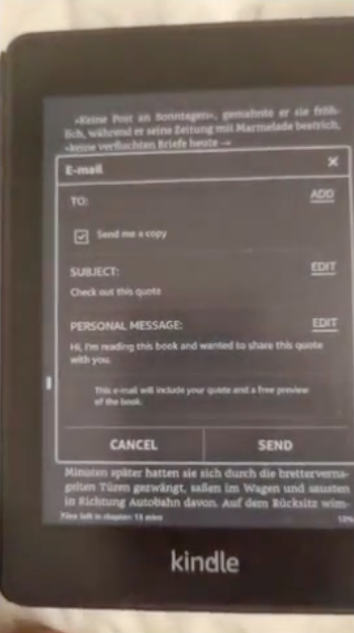
So what lands in Zapier is Kindle’s own template: subject Check out this quote, body hi, I’m reading this book and wanted to share this quote with you, and the quote itself buried underneath. Step 2 runs regex over that to get the word back out, and Frau Deutsch takes it from there.
Learnings
A few weeks of bedtime reading looks like this.
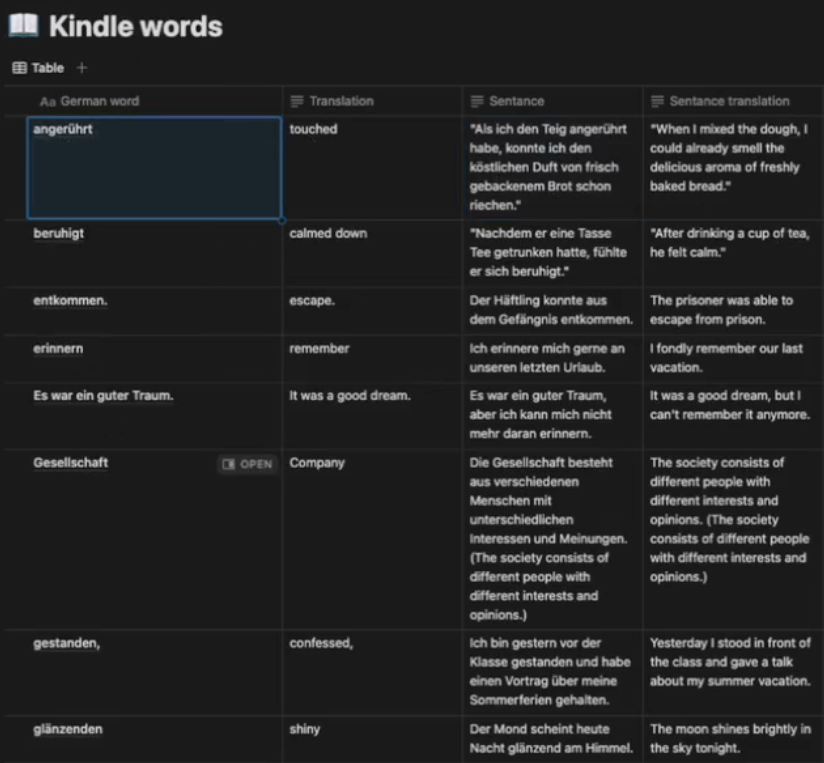
The words repeat. A lot of them turn out not to be one-offs, so I keep running into them again a few chapters later, and re-recognising them as I read is the good bit.
The sentence is the bit I actually study. Glänzenden means shiny, which I could have looked up in two seconds, and what goes on the card is Frau Deutsch’s sentence about the moon.
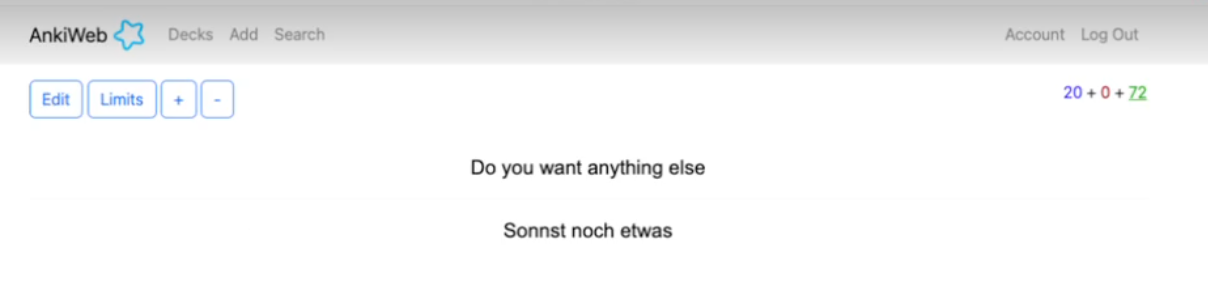
The last hop is still me. AnkiWeb doesn’t connect nicely into Zapier, so the pipeline stops at Notion and I copy the words across myself.
Next steps
What’s still broken
- AnkiWeb doesn’t connect nicely into Zapier, so I make every flashcard manually. I need to spend some time learning webhooks.
- Nothing classifies the word. A reflexive verb, a noun and a regular verb all work differently in German and all get the same shaped card.
- The regex takes whatever it finds. Es war ein guter Traum is sitting in the German word column as a whole sentence, and entkommen and gestanden both came through wearing the punctuation that followed them in the book.
What I want to build
- Classify the words by type, and build a better flashcard for each type. That tip came from friends, not from me.
- Rank each word by how often the average German speaker uses it, add it as a column, and study the common ones first. I need to be familiar with the most common words before I go describing nuanced German sentences.
- Learn webhooks so the card gets made without me.
I used it. 220 words went into the deck before I gave up on Harry Potter, which was too hard for me.