
Making my physical journal ctrl-f able
My bookshelf is full of precious lectures, ideas and adventures. It fills me with pride of a life well lived and thoughts well thought, then dread, because I regularly need one specific entry buried in that mess. I want to ctrl-K my bookshelf.
I’m going through my funemployment right now, so I’ve been using no-code and AI tools to automate away the trivial things that marginally annoy me every day. This is project one.
Context
Since I moved to Europe I’ve been journaling a lot. Lectures I’ve sat through, things I’ve learnt, memories from travelling, all my innermost thoughts. Loads of cool stuff, to me anyway.
The problem is they’re an unorganised mess, so I can never find anything. I went looking for one page from a conference three years ago and it took me half an hour of messing around.
Hunting through the pile, I realised how fragile it all is. My dad has a history of accidentally setting kitchens on fire, and I’m a more accident-prone version of him. Those who know me know I’ll probably destroy these notebooks soon.
So the goal was a tool where I write my notebook out by hand and push it into the cloud, searchable and easy to read. I still get to write things down physically, and until Notion paywalls me, my thoughts are secure and searchable.
How it’s built
Nine steps in Zapier, two of them little JavaScript blocks. I photograph a page and it comes out as a Notion entry I can search.
- Google Drive
1. New File in Folder
The photo of the page I’ve just written.
- Nanonets
2. Extract text from photo
Finds the labelled sections and writes them straight into Sheets.
- Zapier
3. Delay For 1 min
Gives Nanonets time to finish writing its rows.
- Google Sheets
4. Get number of pages in journal entry
An entry usually runs over more than one page.
- Zapier
5. Get number of pages
Makes it a number the next step can use.
- Google Sheets
6. Lookup Spreadsheet Rows (output as Line Items)
Pulls every page of the entry back as one list.
- Zapier
7. Format raw text to markdown
The markdown I wrote on the page becomes real markdown.
- Notion
8. Create Database Item
One item in my Physical journal database.
- WhatsApp
9. Send Message
Tells me the entry has landed.
The stack
- Google Drive · One folder. Every photo of a page lands here.
- Nanonets · Reads the photo and finds the labelled sections.
- Google Sheets · One row per page.
- Zapier · Runs the nine steps, counts the pages, and formats the text to markdown.
- Notion · The Physical journal database. One item per entry.
- WhatsApp · The ping when an entry is done.
The paper page does some of the work
The page is marked up before I photograph it: a label for the heading, a label for the entry, and markdown by hand. Nanonets looks for those labels on the way through.
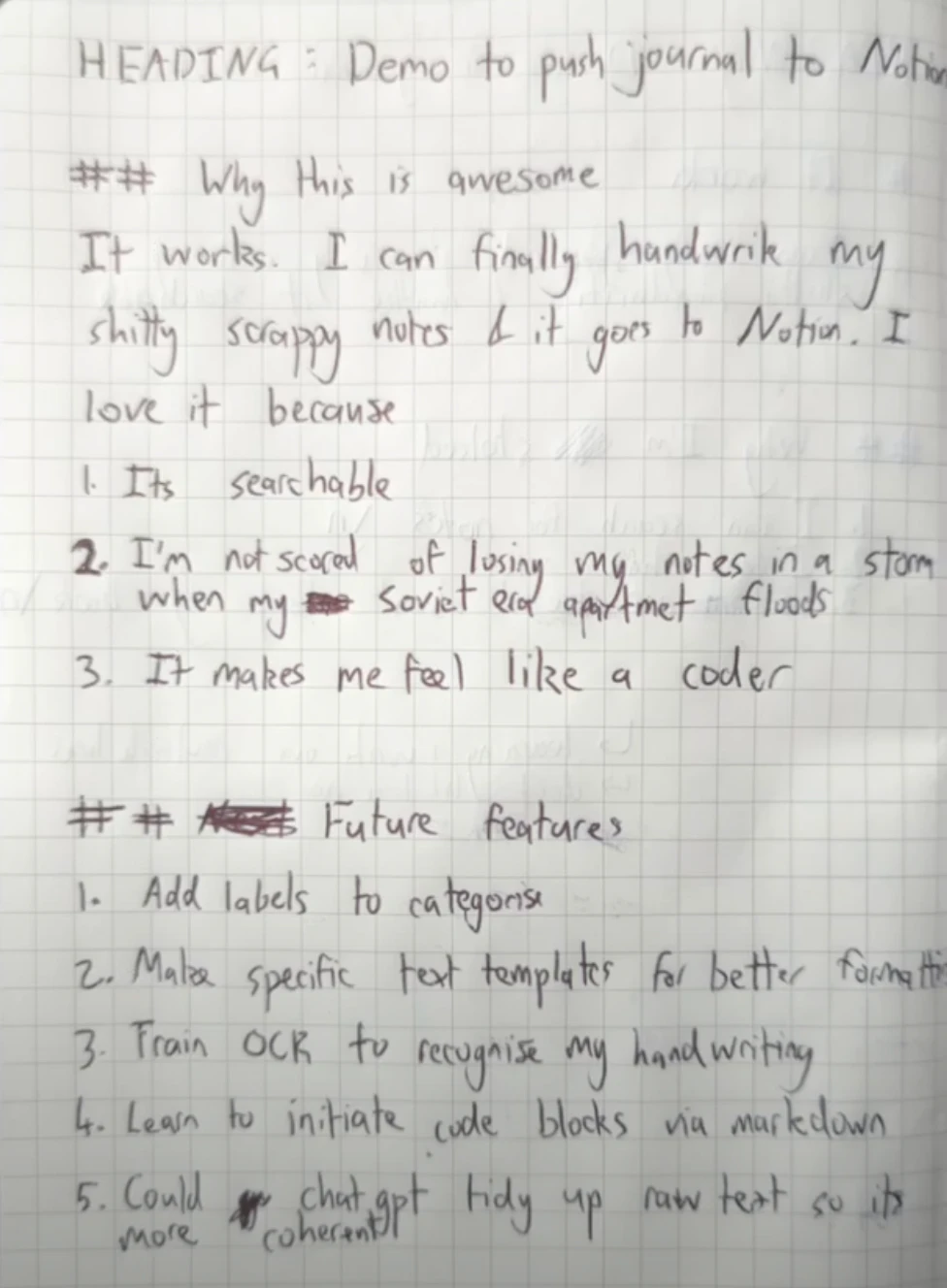
Two hashes in biro come out as a real heading in Notion. That’s step 7.
Nanonets writes one row per page and pushes straight to Google Sheets. Zapier then cleans and combines those rows into one tidy Notion entry: the heading as the title, the scanned file name, a link to the original photo, and the content.
Learnings
That page came out the other end like this.
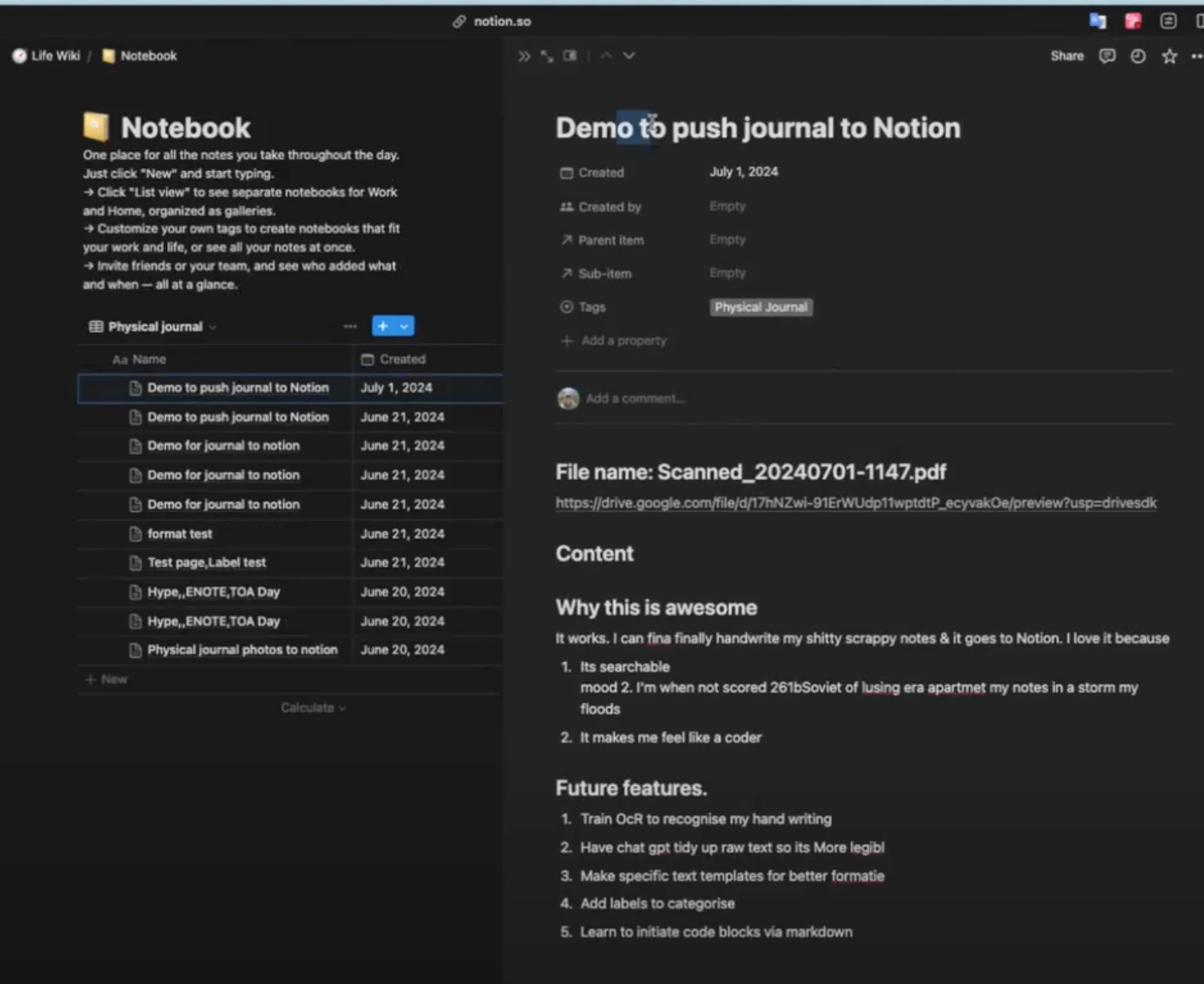
The headings and the numbered list survived the trip. The words inside them did not.
1. Its searchable
    mood 2. I’m when not scored 261bSoviet of lusing era apartmet my notes in a storm my floods
2. It makes me feel like a coder- The structure survives better than the words do. Headings and numbered lists come through clean, and the sentences inside them are a mess.
- My handwriting is the bottleneck. The OCR doesn’t always catch the right words and some of the spelling comes out weird.
- The link back to the original photo does the work the text can’t. OCR won’t read my drawings, so for those pages the photo is the record.
- The tool is very generalised and my entries aren’t. A daily journal entry, a travel entry, and me trying to think through a specific thought are all different shapes.
Next steps
What’s still broken
- The OCR guesses at my handwriting, so entries arrive with the wrong words, odd spelling, and occasionally one fewer list item than I wrote.
- Nothing fixes the text after the OCR. Step 7 turns it into markdown, it doesn’t correct it.
- Google Sheets is in the middle purely as a bridge, because Nanonets doesn’t connect to Notion directly.
What I want to build
The demo page had its own list of future features on the back half, so here it is.
- Add labels to categorise, so I can run specific entries through different flows.
- Make specific text templates for better formatting, so daily entries, travel entries and thinking-out-loud entries each get their own shape.
- Train the OCR to recognise my handwriting.
- Learn to initiate code blocks via markdown. Notion’s pretty overpowered and this is the hardest one.
- Get ChatGPT to tidy up the raw text so it’s more coherent.
This feels like my first dive into using AI to automate my own world. There is so much potential and I actually feel overwhelmed by the number of ideas I’m jotting down. Thankfully now it’ll be easier to keep track of them all.